spadmin.py BETA site
Update:
We finally decided to let this project fly by itself and open the source.
GitHub repo link: https://github.com/IBMSPadmin/spadmin
Take it away!
The next-generation of dsmadmc command line tool. Available for Mac 🍎, Linux, and Windows (WSL).
We’ve created this page where you can try our new program called spadmin.py out and share any bugs or comments with us.
Introduction
With many years of experience behind us, we’ve created a utility that can help the daily work of IBM Spectrum/Storage Protect administrators.
With my colleagues, we’ve been trying around to find a good tool to make our own daily TSM/SP work easier. We’ve made several Perl-based solutions like tsmadm.pl and we have had a Node.js poc in the past. These are the ones that are still available on the web.
More than a year ago, we tried to create such a solution in Python3, which is so popular today. We’re not Python programmers, but we wanted to try how to solve this in Python. At the moment we have reached a stable state that we would like to share and get feedback on.
We ask you to contribute with your constructive comments and suggestions to the developers. The source code not yet opened for the public.
Main features
- cli with IBM SP command completion
- the command complition can also handle IBM SP objects
- command aliases
- command history
- command result history (TimeMachine)
- grep
- HTML output
- predefine custom commands for easier daily work
- historical data retrieve
Prerequisites
Currently supported operating systems
- Linux: Ubuntu, Centos
- WSL on Windows
- macOS
- Docker container
- unfortunately, these functions: GNUreadline, pexpect + Unix fork cannot be done nicely in Python3 under Microsoft Windows, so we had to drop the direct support of Microsoft Windows
Python
- python3
IBM Spectrum Protect
- IBM Spectrum Protect v6, v7, v8 (some commands will of course still run on the old v5 systems, but not all)
Releases, get spadmin.py
If you want to try it on your own environment download the latest pregenerated binaries (Linux, maxOS) you can find them here:
https://github.com/IBMSPadmin/beta/releases
If you want to try it on our live test environment instead, you can use the following command: ssh spadmin@158.177.249.114
/* The password is: spadmin */
Simple Example
Type: que and press TAB+TAB
Type: no and press TAB+TAB and press SPACE
Type: TS and press TAB+TAB and choose a node “TSM”.
Type: T and press TAB+TAB and choose a node “Type=” press TAB+TAB and choose: “Cl” TAB+TAB
Do you feel it???
Installation steps
The standard dsmadmc command should work on the machine where you want to use it!
[spadmintsm ~]$ dsmadmc -id=demo -pa=password q sess
You can setup your own credentials at spadmin.py first start.
IBM Storage Protect
Command Line Administrative Interface - Version 8, Release 1, Level 21.0
(c) Copyright by IBM Corporation and other(s) 1990, 2023. All Rights Reserved.

Session established with server TSM8: Linux/x86_64
  Server Version 8, Release 1, Level 21.000
  Server date/time: 04/22/2024 09:38:27  Last access: 04/22/2024 09:36:23

ANS8000I Server command: 'q sess'.

 Sess      Comm.      Sess        Wait       Bytes       Bytes      Sess        Platform     Client Name
Number     Method     State        Time        Sent       Recvd     Type
------     ------     ------     ------     -------     -------     -------     --------     ------------------
    16     SSL        Run          0 S          150         247     Admin       Linux        DEMO
                                                                                 x86-64

ANS8002I Highest return code was 0.
[spadmintsm ~]$ python3 –version
Python 3.6.8
[spadmintsm ~]$ cat /etc/centos-release
CentOS Linux release 7.9.2009 (Core)
[spadmintsm ~]$ wget https://github.com/IBMSPadmin/beta/releases/download/RLS/spadmin_CentOS7.9_py3.6.8
--2024-04-22 09:39:19--  https://github.com/IBMSPadmin/beta/releases/download/RLS/spadmin_CentOS7.9_py3.6.8
Resolving github.com (github.com)... 140.82.121.3
Connecting to github.com (github.com)|140.82.121.3|:443... connected.
HTTP request sent, awaiting response... 302 Found
Location: https://objects.githubusercontent.com/github-production-release-asset-2e65be/632006855/b8b4e6ba-3c3f-4f3d-86fb-a5add47945d7?X-Amz-Algorithm=AWS4-HMAC-SHA256&X-Amz-Credential=AKIAVCODYLSA53PQK4ZA%2F20240422%2Fus-east-1%2Fs3%2Faws4_request&X-Amz-Date=20240422T073924Z&X-Amz-Expires=300&X-Amz-Signature=1db4ca5bedb5f13801909e591ab618b531e7db194b41389fa804e1e01238b671&X-Amz-SignedHeaders=host&actor_id=0&key_id=0&repo_id=632006855&response-content-disposition=attachment%3B%20filename%3Dspadmin_CentOS7.9_py3.6.8&response-content-type=application%2Foctet-stream [following]
--2024-04-22 09:39:24--  https://objects.githubusercontent.com/github-production-release-asset-2e65be/632006855/b8b4e6ba-3c3f-4f3d-86fb-a5add47945d7?X-Amz-Algorithm=AWS4-HMAC-SHA256&X-Amz-Credential=AKIAVCODYLSA53PQK4ZA%2F20240422%2Fus-east-1%2Fs3%2Faws4_request&X-Amz-Date=20240422T073924Z&X-Amz-Expires=300&X-Amz-Signature=1db4ca5bedb5f13801909e591ab618b531e7db194b41389fa804e1e01238b671&X-Amz-SignedHeaders=host&actor_id=0&key_id=0&repo_id=632006855&response-content-disposition=attachment%3B%20filename%3Dspadmin_CentOS7.9_py3.6.8&response-content-type=application%2Foctet-stream
Resolving objects.githubusercontent.com (objects.githubusercontent.com)... 185.199.110.133, 185.199.111.133, 185.199.109.133, ...
Connecting to objects.githubusercontent.com (objects.githubusercontent.com)|185.199.110.133|:443... connected.
HTTP request sent, awaiting response... 200 OK
Length: 8068048 (7.7M) [application/octet-stream]
Saving to: ‘spadmin_CentOS7.9_py3.6.8’

100%[===================================================================================================>] 8,068,048   2.47MB/s   in 3.1s

2024-04-22 09:39:28 (2.47 MB/s) - ‘spadmin_CentOS7.9_py3.6.8’ saved [8068048/8068048]
[spadmintsm ~]$ chmod +x spadmin_CentOS7.9_py3.6.8
[spadmintsm ~]$ ./spadmin_CentOS7.9_py3.6.8
/root/spadmin/ directory created.
/root/spadmin/log directory created.
/root/spadmin/TMQueries directory created.
Welcome!
Before we start, you have to add some parameters to handle login for Spectrum Protect
We have found dsmadmc:  /usr/bin/dsmadmc
Enter your Spectrum Protect userid (eg. admin): demo
Enter your password for user 'demo' :

 ███████╗ ██████╗   █████╗  ██████╗  ███╗   ███╗ ██╗ ███╗   ██╗     ██████╗  ██╗   ██╗
 ██╔════╝ ██╔══██╗ ██╔══██╗ ██╔══██╗ ████╗ ████║ ██║ ████╗  ██║     ██╔══██╗ ╚██╗ ██╔╝
 ███████╗ ██████╔╝ ███████║ ██║  ██║ ██╔████╔██║ ██║ ██╔██╗ ██║     ██████╔╝  ╚████╔╝
 ╚════██║ ██╔═══╝  ██╔══██║ ██║  ██║ ██║╚██╔╝██║ ██║ ██║╚██╗██║     ██╔═══╝    ╚██╔╝
 ███████║ ██║      ██║  ██║ ██████╔╝ ██║ ╚═╝ ██║ ██║ ██║ ╚████║ ██╗ ██║         ██║
 ╚══════╝ ╚═╝      ╚═╝  ╚═╝ ╚═════╝  ╚═╝     ╚═╝ ╚═╝ ╚═╝  ╚═══╝ ╚═╝ ╚═╝         ╚═╝

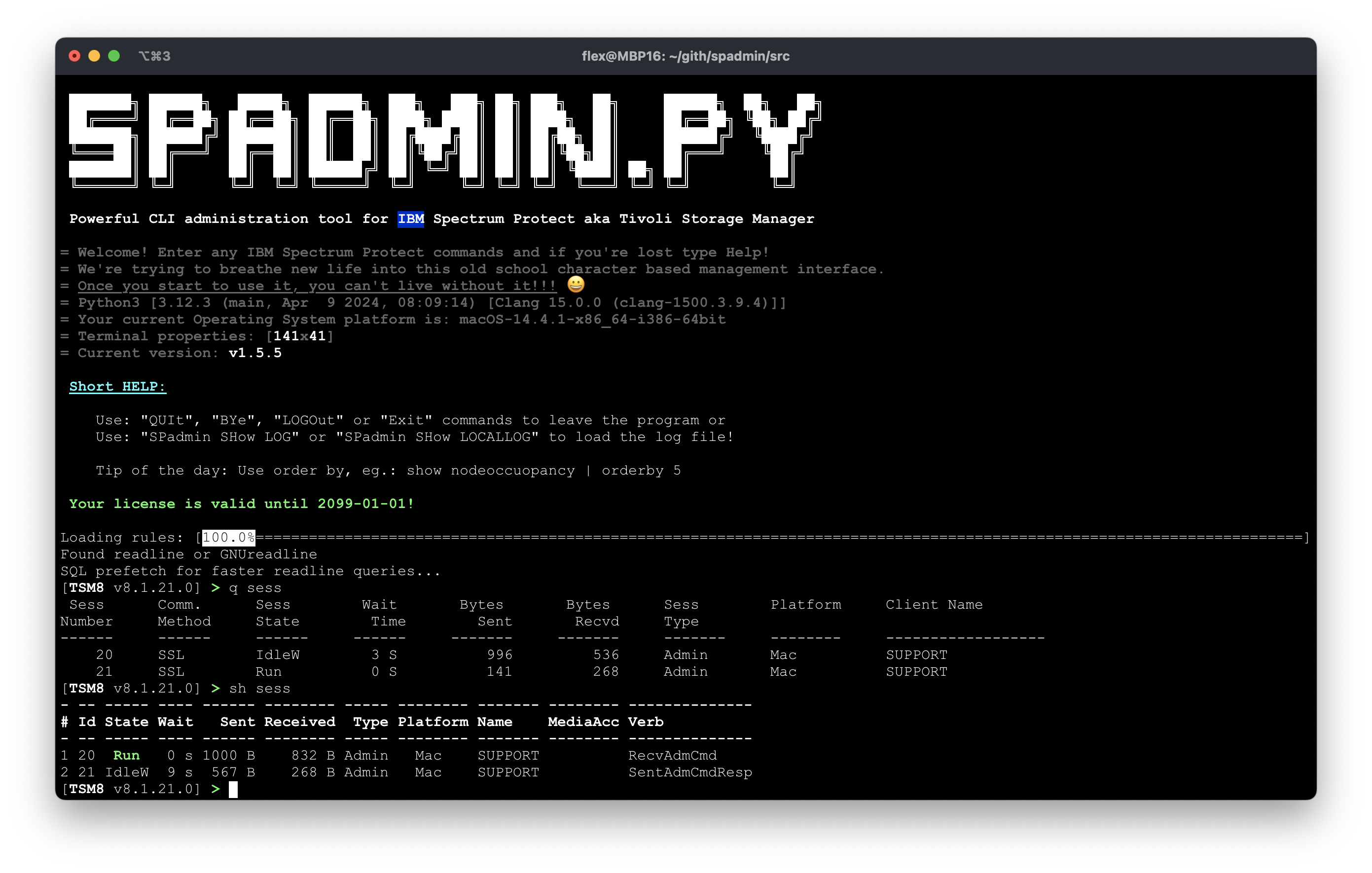
 Powerful CLI administration tool for IBM Spectrum Protect aka Tivoli Storage Manager

= Welcome! Enter any IBM Spectrum Protect commands and if you're lost type Help!
= We're trying to breathe new life into this old school character based management interface.
= Once you start to use it, you can't live without it!!! 😀
= Python3 [3.6.8 (default, Nov 14 2023, 16:29:52)
[GCC 4.8.5 20150623 (Red Hat 4.8.5-44)]]
= Your current Operating System platform is: Linux-3.10.0-1160.114.2.el7.x86_64-x86_64-with-centos-7.9.2009-Core
= Terminal properties: [141x41]
= Current version: v1.5.5

 Short HELP:

    Use: "QUIt", "BYe", "LOGOut" or "Exit" commands to leave the program or
    Use: "SPadmin SHow LOG" or "SPadmin SHow LOCALLOG" to load the log file!

    Tip of the day: Use grep and regexp together, eg.: show actlog | grep ANR....E

Ohh, nooo! You have no license file!
If you are find this utility helpful, and would like to ask a 30 days trial,
just send an email us to the send_me_a_trial_license@spadmin.com with the following content:

--- CUT ---
SPAdmin Team,
send me a trial license for spadmin, please.
My Machine's Globally Unique ID where I want to use it: c4.6d.11.62.55.ca.ed.11.94.c4.06.ec.49.44.c5.7b

Thanks.
--- CUT ---
How does it work?
After the first start spadmin.py will create a folder in your ~ (home) directory, where it will store the configuration, license, log and other important files. Then spadmin will asks your dsmadmc userid and password, and opens two sessions for your server. After the login these two sessions will be used.
License
You can request a licence to try this out from here: get.spadm.lic@gmail.com
Command examples
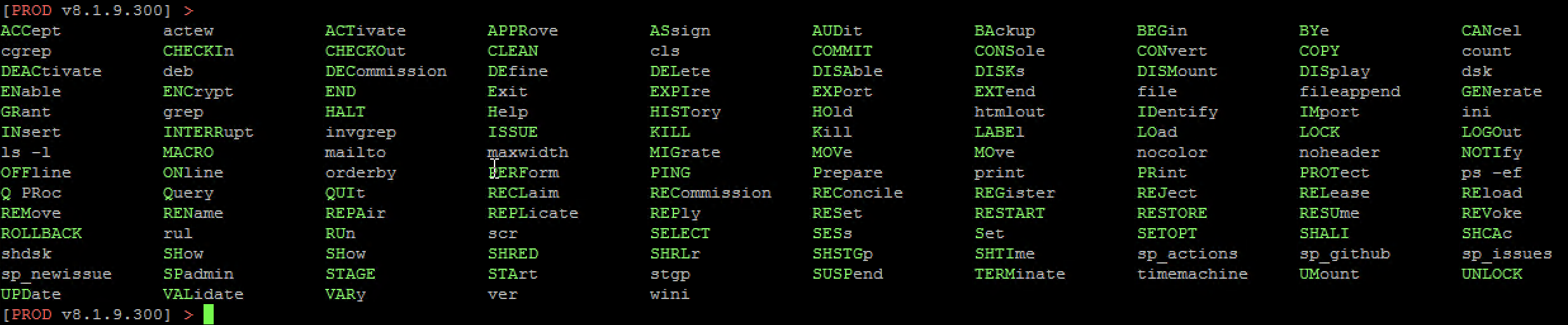
Simple TAB+TAB:
This happens when you simply press tab+tab, i.e. you see the first level of the available commands.
The available built-in commands:
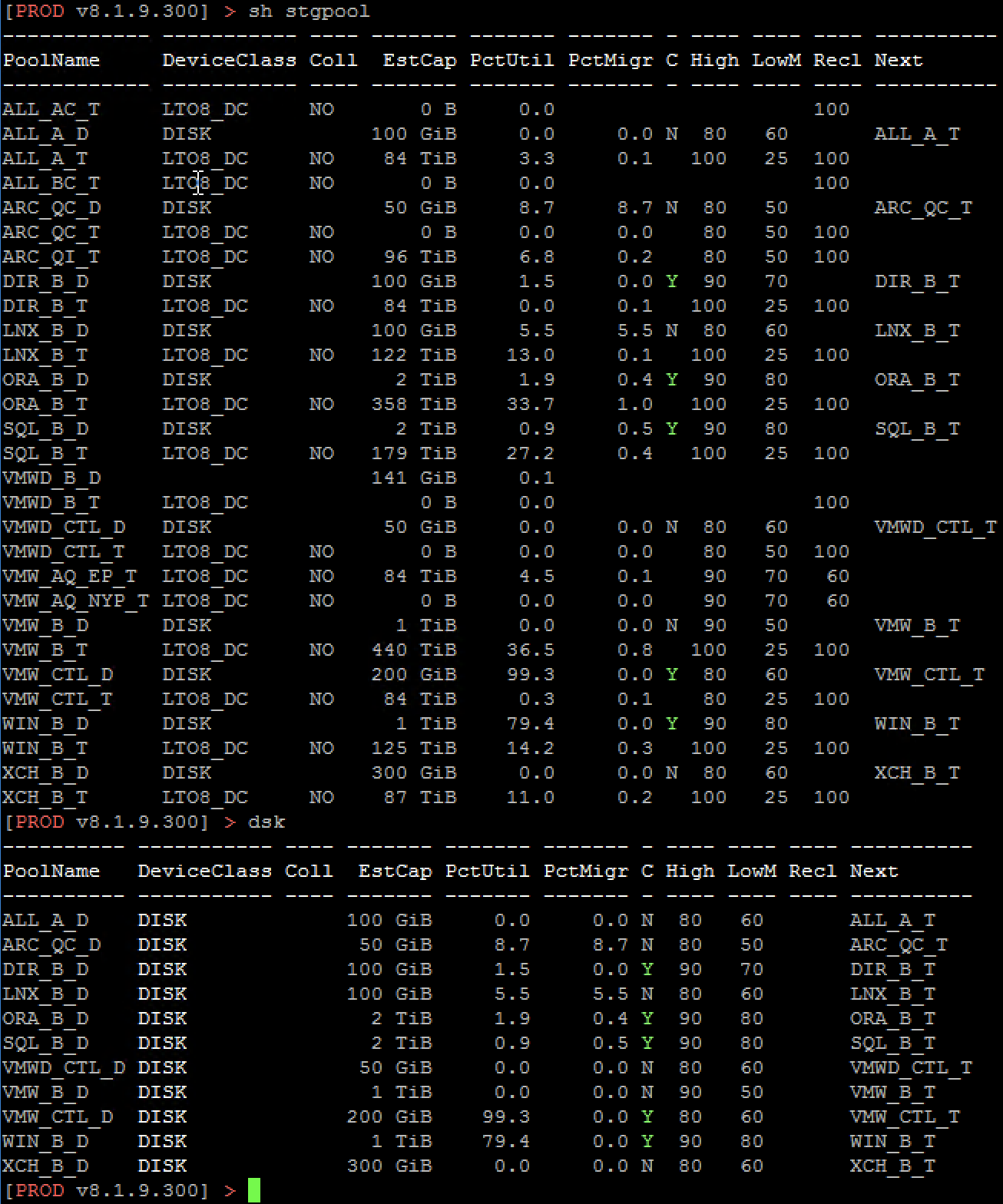
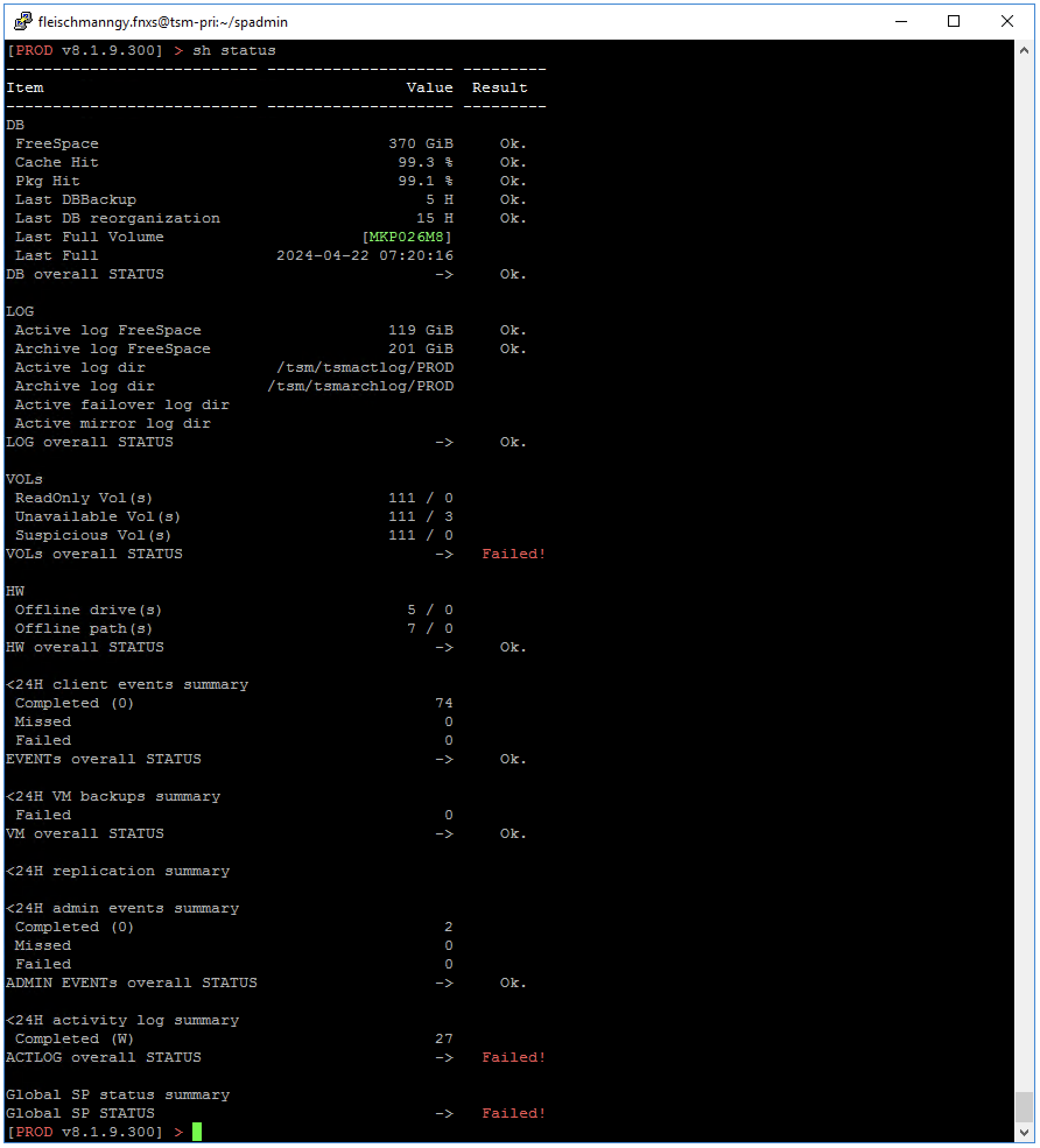
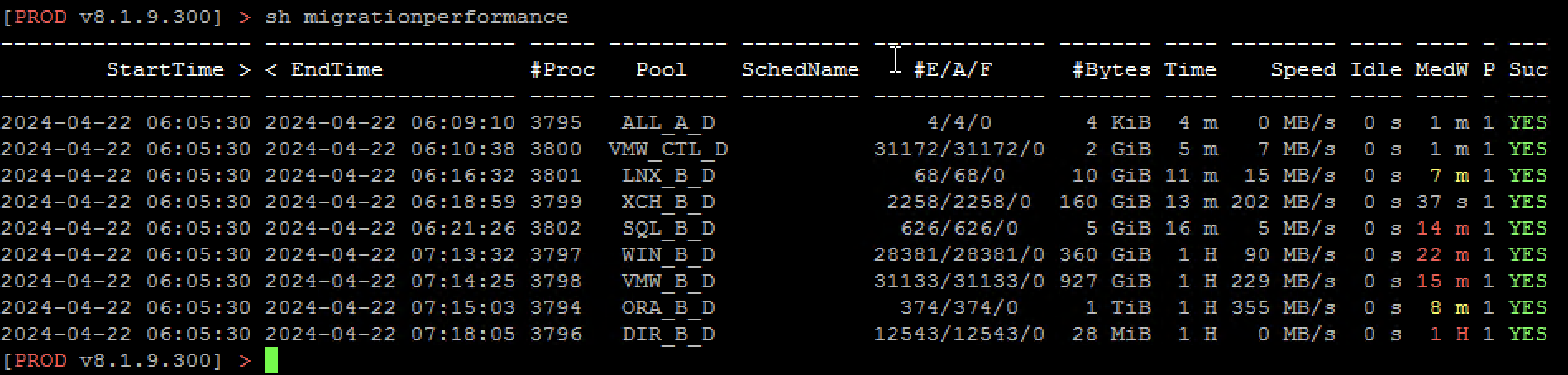
These are our own built-in commands that we have modified a bit from the original to make the output easier to understand. They usually start with a show keyword.
- SHow ADMINEVents
- SHow CLIENTARCHIVEPERFormance
- SHow CLIENTBACKUPPERFormance
- SHow CLIENTRESTOREPERFormance
- SHow CLIENTRETRIEVEPERFormance
- SHow COLumns
- SHow COPYGroups
- SHow DBBACKUPPERFormance
- SHow DBBackups
- SHow DBSBackups
- SHow DRives
- SHow EVents
- SHow FILLings
- SHow INActives
- SHow MIGRATIONPERFormance
- SHow MIssinglibvolumes
- SHow MOUnt
- SHow MOVEDATAPERFormance
- SHow NODEOccuopancy
- SHow PAth
- SHow PRocesses
- SHow RECLAMATIONPERFormance
- SHow REPLICATIONDifferences
- SHow RULer
- SHow SCRatches
- SHow SESsions
- SHow STGPOOLBACKUPPERFormance
- SHow STGpools
- SHow STatus
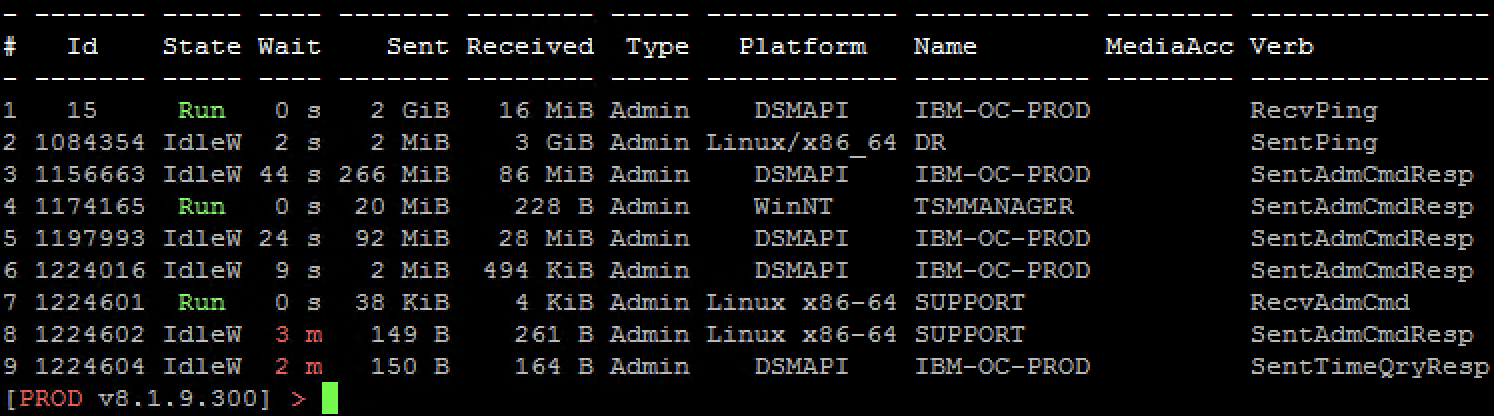
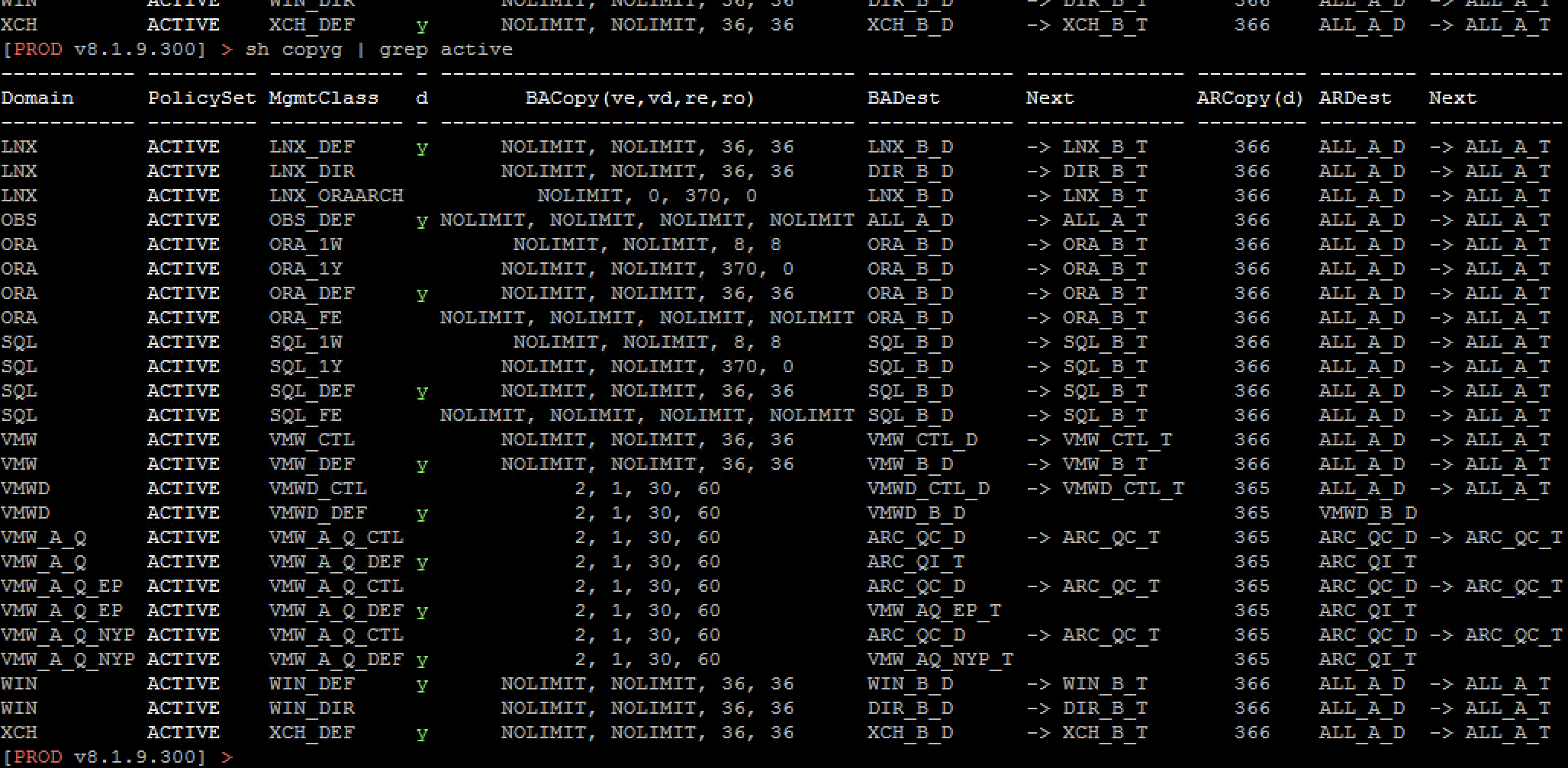
Let’s see the output of these commands:
[TSM8 v8.1.21.0] > SHow SESsions alias ‘query session’

[TSM8 v8.1.21.0] > SHow PRocesses alias ‘query process’


[TSM8 v8.1.21.0] > SHow COPYGroups
[TSM8 v8.1.21.0] > sh STGpools alias ‘query stgpool’
[TSM8 v8.1.21.0] > sh STATUS
[TSM8 v8.1.21.0] > sh MIGRATIONPerformance
FUTURE
If you are interested, there are several ways you can support us:
- you can report bugs here for the time being
- you can start a discussion, share your opinion, give ideas, make suggestions
- here you can contribute financially to this project with GitHub Sponsors, BuyMeACoffee
- if you have a specific need for an extension, you can also use this way of support with your request
- if you feel that you have the knowledge, we welcome the help of good programmers, and you can show the seriousness of your interest (minimum 9.99,- EUR 😃) with your support and get full access to our source code at GitHub
Issues
How you should help us debuging any issues you’re having with spadmin.py. The spadmin show log command may identifies the issues. Most of the time, you won’t need to do anything else just send us the log via Github Issues with a small description of the expected behaviour!
Expected output example
[TSM8 v8.1.21.0] > spadmin show log
https://github.com/IBMSPadmin/beta/issues
Feature requests, free discussions
All feature requests are welcome! If you’ve got an idea for another feature or anything that would make your backup admin life easier, please get in touch! If you have a more in-depth idea, please get in touch - we’d love to discuss it with you 😀
The best way to request a feature is via our GitHub Discussions page
